Why Cybersecurity Matters for North West Manufacturers
Manufacturing remains one of the most targeted sectors for cyber attacks as organisations increasingly adopt connected technologies such as Industrial IoT, AI, automation, cloud platforms and Operational Technology (OT) systems.
According to recent industry reports, ransomware and supply chain attacks against manufacturers continue to rise globally, with attacks capable of halting production lines, disrupting logistics, exposing intellectual property and causing significant financial losses.
For SMEs across the North West, strong cybersecurity is essential for protecting business continuity, maintaining customer trust and supporting safe digital transformation aligned with Industry 5.0 principles.
Sources: UK National Cyber Security Centre (NCSC) · IBM X-Force Threat Intelligence Index · ENISA Threat Landscape for Manufacturing · European Commission Industry 5.0 Guidance
Cyber Essentials Preparation Guide
Practical self-assessment preparation booklet aligned with the UK Cyber Essentials scheme. Covers firewalls, MFA, secure configuration, patching, user access control and more.
Open PDF GuideOfficial Cyber Essentials Requirements (2025)
Official NCSC Cyber Essentials requirements guide covering firewalls, MFA, secure configuration, patching, malware protection, cloud services, remote working and access control.
Open Official Requirements GuideLearn More About the Five Cyber Essentials Controls
Scroll sideways to browse the five controls →
1. Use a firewall to secure your Internet connection
Understand how firewalls help protect your organisation from unauthorised access.
Learn More2. Use secure settings for your devices and software
Default settings can leave systems too open. Secure configuration reduces avoidable risk.
Learn More3. Control who has access to your data and services
Good access control helps ensure only authorised people can access systems and information.
Learn More4. Protect yourself from viruses and other malware
Malware protection helps reduce the risk of harmful software disrupting your business.
Learn More5. Keep your devices and software up to date
Patch management helps fix known weaknesses before attackers can exploit them.
Learn More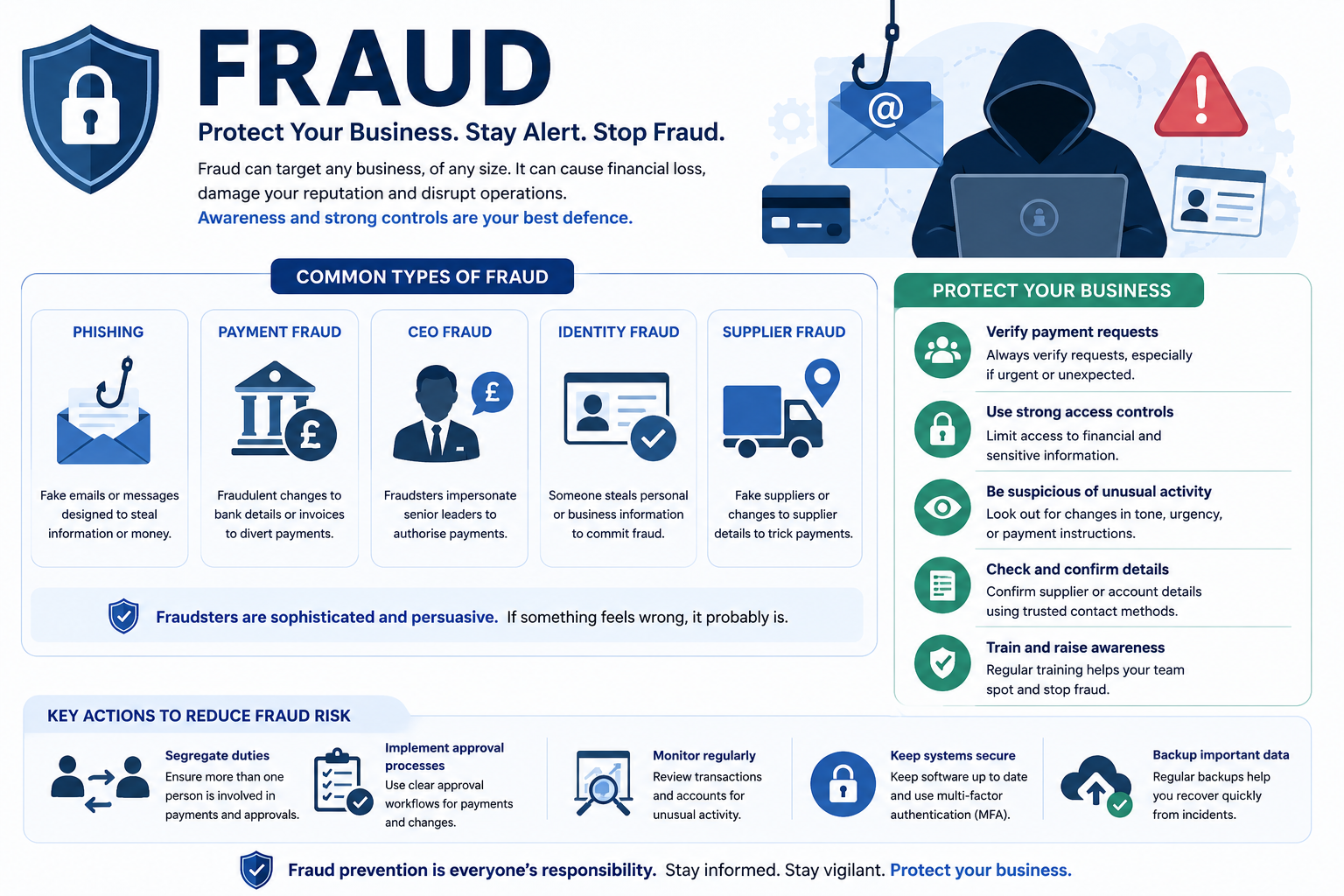
The 5 Pillars of Manufacturing Cyber Resilience
Use these five pillars as your practical framework. Build them step by step to create strong, sustainable cyber resilience.
Board-level ownership and clear cyber risk oversight.
Cyber risk is a business risk. Leaders must understand it and provide strategic direction.
Identify and manage threats across IT, OT, and the supply chain.
Understand your biggest risks and prioritise what needs protection most.
Train staff and build a security-aware workforce.
Technology alone is not enough — people are your first line of defence.
Secure networks, devices, and systems (IT + OT).
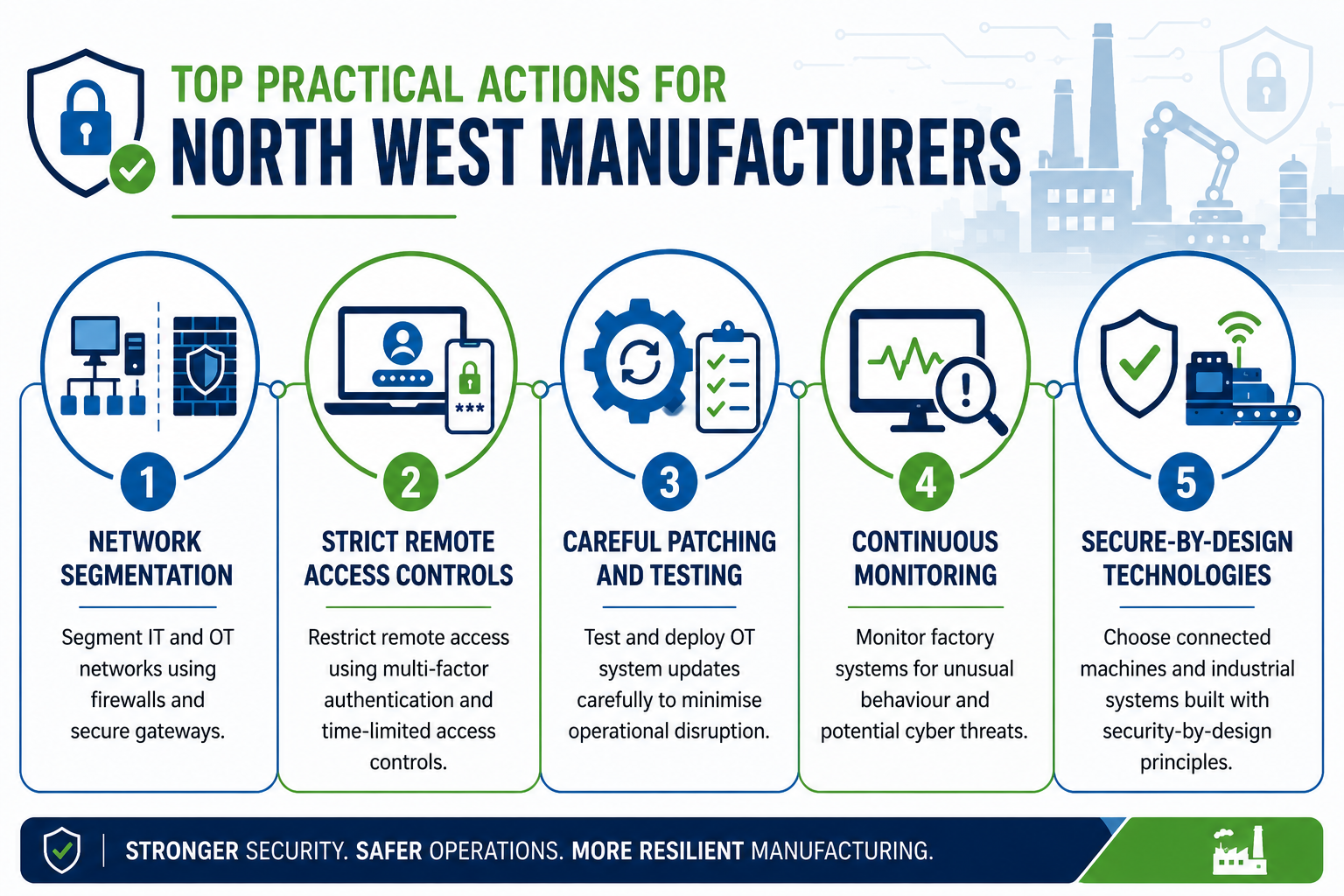
Implement Zero Trust, strong access controls, patching, and segmentation between IT and factory systems.
Prepare to respond, recover quickly, and learn from incidents.
Have tested incident response plans, backups, and business continuity measures in place.
OT/ICS Security for Manufacturing
Manufacturing systems such as PLCs, SCADA, robots, sensors and automated production lines use Operational Technology (OT) and Industrial Control Systems (ICS). These systems directly control physical processes on the factory floor.
Why OT Needs Special Protection
- IT systems focus mainly on confidentiality of data.
- OT/ICS systems focus on availability, safety and real-time control. Even a short cyber incident can stop production lines, damage equipment or create safety risks.
- Legacy OT equipment is often 10–20 years old and was never designed for internet connectivity or modern threats.
The Purdue Model – Simple Network Architecture Guide
The Purdue Model divides factory networks into clear levels (0–5). It helps you separate office IT from factory OT so problems cannot easily spread.
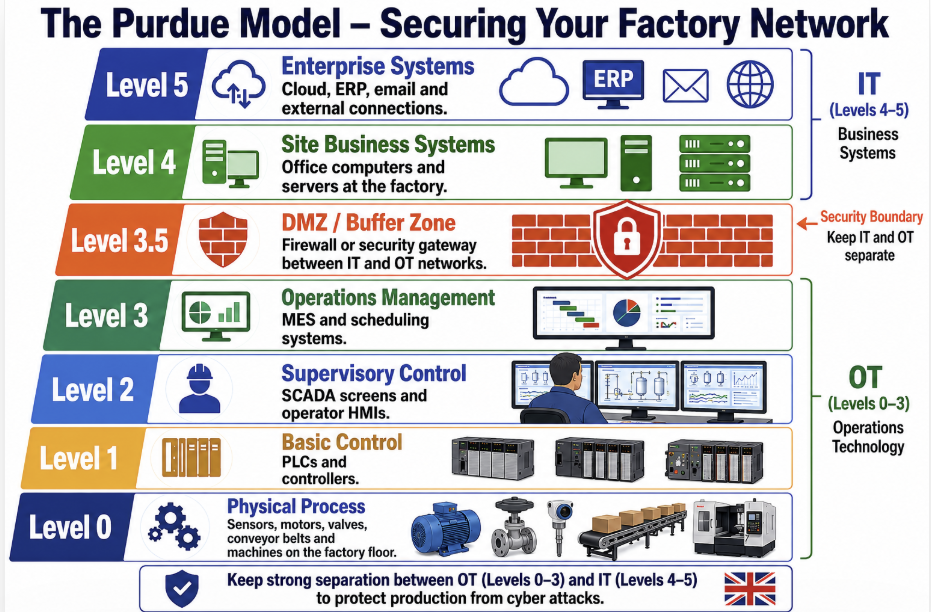
Key Protection Idea: Keep strong separation between OT (Levels 0–3) and IT (Levels 4–5). Use firewalls or data diodes in the DMZ (Level 3.5) so that a problem in the office cannot reach the factory floor.
Practical tip for SMEs: Draw your own simple version of this model for your factory. List your equipment in each level. It immediately shows you the best places to add protection.
ISA/IEC 62443 Series
A series of international cybersecurity standards for Industrial Automation and Control Systems (IACS), supporting the security of Operational Technology (OT) environments.
Explore ISA/IEC 62443 SeriesSource: NCSC Secure Connectivity Principles for Operational Technology (developed with international partners).
Practical Cybersecurity Guidance and Toolkits for Manufacturing SMEs
Cybersecurity improvements are most effective when they are practical, prioritised and regularly reviewed. For manufacturing SMEs, the aim is not to address every cyber risk at once, but to focus first on actions that reduce common threats and support business continuity.
The following guidance and toolkit resources are designed to help SMEs review their current cybersecurity practices, identify gaps and take manageable steps towards stronger cyber resilience. They can support internal discussions, staff training, supplier reviews, incident preparation and Cyber Essentials readiness.
Sources: NCSC Small Organisations Guide · NCSC 10 Steps to Cyber Security · ICO Data Security Guidance
Core Cybersecurity Actions for SMEs
Manufacturing SMEs should begin by identifying the systems, data and processes that are most important to daily operations. This may include production schedules, customer orders, supplier records, finance systems, employee data, design files, quality documentation, cloud platforms and any systems connected to machinery or operational technology.
Once critical assets are identified, SMEs should focus on a small number of high-impact actions. Click each action below to see why it matters.
Keep secure backups of files needed to run the business, such as orders, finance records, production data and design files. Test backups regularly so you know they can be restored during disruption.
Apply updates to laptops, servers, phones, routers, cloud tools and factory-connected systems where safe to do so. Updates often fix known security weaknesses that attackers may exploit.
Use strong unique passwords and multi-factor authentication, especially for email, cloud platforms, finance systems, administrator accounts and remote access.
Only give administrator rights to people who genuinely need them. This reduces the damage if an account is compromised or malware gets onto a device.
Help staff recognise phishing emails, fake invoices, malicious links, impersonation calls and unusual payment requests. Make reporting suspicious activity simple and blame-free.
Check who can access your systems remotely, including IT providers, software vendors and machinery support partners. Remove access that is no longer needed and use MFA where possible.
Agree who does what during an incident, who to contact, how to isolate affected systems, where backups are stored and how production will continue while recovery is underway.
These actions can help reduce risks linked to phishing, ransomware, account compromise, data loss and operational disruption.
Source: NCSC 10 Steps to Cyber Security
Protecting Accounts and Access
User accounts are often targeted because they can provide access to email, cloud systems, finance tools, supplier portals and business data. For manufacturing SMEs, compromised accounts can lead to fraud, data exposure or disruption to daily operations.
Use strong, unique passwords
Important accounts should use strong, unique passwords that are not reused across other websites or services.
Enable multi-factor authentication
MFA should be enabled wherever possible, especially for email, administrator accounts, finance systems, cloud platforms and remote access tools.
Limit access by role
Staff should only have access to the systems and information they need for their job. This reduces the impact if an account is compromised.
Remove unused accounts quickly
When employees, contractors or suppliers leave, their accounts should be removed or disabled promptly.
Quick access review question
Could an old employee, supplier or unused administrator account still access your email, cloud tools, finance systems or production data?
Source: NCSC Small Organisations Guide
Practical Cyber Resilience Areas for Manufacturing SMEs
Manufacturing SMEs should focus on a number of practical areas that help reduce disruption, strengthen resilience and support day-to-day operational security.
Backups are essential for reducing the impact of cyber incidents. Reliable backups can help restore customer orders, production schedules, payroll, supplier records, design files and compliance data.
Backups should be made regularly, stored securely and tested to make sure they can be restored when needed.
Source: NCSC Small Organisations Guide
Software updates often fix known security weaknesses. SMEs should keep laptops, phones, servers, routers, websites and cloud systems updated wherever possible.
Where older systems cannot be updated, they should be isolated, protected or replaced where practical.
Source: NCSC 10 Steps to Cyber Security
Cyber risk can come through suppliers, cloud providers, maintenance contractors and external IT partners.
- Which suppliers can access systems or data?
- Which suppliers are critical to operations?
- Do suppliers use secure remote access?
- Are old supplier accounts removed quickly?
Even with strong protections, incidents can still happen. SMEs should prepare in advance so disruption can be reduced and recovery decisions are faster.
- Who should be contacted first?
- How will systems be isolated?
- How will backups be restored?
- Who informs customers and suppliers?
Sources: NCSC Incident Management · NCSC Response & Recovery Guide
Manufacturing SMEs may hold employee, customer, supplier and contractor data. Good cybersecurity practices also support data protection and business trust.
Good practice includes MFA, strong passwords, staff awareness, access control and secure backups.
Sources: ICO Guide to Data Security · ICO Personal Data Breaches Guide
Cyber Essentials is a UK government-backed certification scheme that provides a practical baseline for cyber hygiene and resilience.
It focuses on firewalls, secure configuration, access control, malware protection and security updates.
Sources: NCSC Cyber Essentials Overview · NCSC Cyber Essentials Resources
General Practical Cybersecurity Toolkits
Downloadable resources to support cybersecurity planning, supplier management, incident preparation and policy development.
Scroll sideways to browse the toolkits →
Cybersecurity Readiness Checklist
Review accounts, devices, backups, staff awareness, supplier access and incident preparation.
Download ChecklistSupplier Cyber Risk Checklist
Review supplier access, remote access, assurance and business continuity dependencies.
Download ChecklistCyber Incident Response Toolkit
Prepare for, respond to and recover from cyber incidents.
Download ToolkitCybersecurity Policy Starter Template
Create a simple internal cybersecurity policy.
Download TemplateCybersecurity Improvement Action Plan
Record improvements, assign responsibilities and track progress.
Download Action PlanAdditional references: NCSC Small Organisations Guide · NCSC 10 Steps · NCSC Supply Chain Security · NCSC Incident Management · Cyber Essentials · ICO Data Security
Cybersecurity Risks in AI Adoption
AI can help manufacturers improve productivity, quality control and decision-making, but it can also introduce new cybersecurity risks when connected to business data, cloud platforms or operational systems.
For broader guidance on responsible AI use, governance and human oversight, visit the Safe AI page.
Data Poisoning
Attackers manipulate data so AI systems learn the wrong patterns.
Click to learn more →Data Poisoning
Bad training, supplier or sensor data can lead to incorrect AI outputs.
Manufacturing example: faulty quality inspection or wrong maintenance predictions.
Action: protect datasets, validate data sources and monitor AI outputs.
Model Theft
AI models can contain valuable business knowledge and intellectual property.
Click to learn more →Model Theft
Stolen models may expose production logic, process knowledge or competitive information.
Manufacturing example: a competitor gains insight into your optimisation model.
Action: restrict access, log usage and protect model files/API access.
Prompt Injection
Malicious instructions can trick AI tools into unsafe behaviour.
Click to learn more →Prompt Injection
Hidden instructions in emails, documents or webpages may override AI rules.
Manufacturing example: an AI assistant reveals sensitive supplier data.
Action: limit AI permissions and review outputs before action.
Supply Chain Risks
Third-party AI tools, plugins and datasets can introduce weaknesses.
Click to learn more →Supply Chain Risks
AI tools often rely on external models, APIs, libraries and datasets.
Manufacturing example: an insecure plugin connects to internal files.
Action: check suppliers, contracts, security controls and update practices.
Increased Attack Surface
Connecting AI to business or factory systems creates new entry points.
Click to learn more →Increased Attack Surface
AI connected to cloud tools, business systems or OT environments can increase cyber exposure.
Manufacturing example: AI linked to production data becomes a new target.
Action: use access controls, monitoring, segmentation and incident planning.
Sources: NCSC AI cyber security guidance · NCSC secure AI development guidelines · NCSC ML supply chain principles · NIST adversarial machine learning taxonomy
Cyber Governance for Boards
Source: NCSC Cyber Governance for Boards
Cyber risk is a principal business risk. Boards must provide effective oversight even if they are not technical experts.
Key Governance Principles (NCSC)
Identify and understand cyber risks across IT and OT environments, including supply chain risks.
Integrate cyber security into the overall business strategy with clear board-level ownership.
Promote a positive security culture and ensure staff understand their responsibilities.
Regularly review performance and hold management accountable.
Ensure robust plans exist to respond to and recover from cyber incidents.
NCSC's Cyber Security Training for Staff
Source: NCSC Official Guidance
The NCSC has developed a free, easy-to-use e-learning package called "Staying Safe Online: Top Tips for Staff". Ideal for manufacturing teams.
Duration: Less than 30 minutes • Completely free
What the Training Covers:
- Why cyber security matters to everyone
- How cyber attacks happen
- Defending against phishing
- Using strong passwords
- Securing your devices
- Reporting incidents (“If in doubt, call it out”)
Quick Cyber Maturity Self-Check for SMEs
Score each statement from 1 (Not started) to 5 (Fully in place). Total score out of 50.
Your Total Score: 0/50
Reflection Questions
- What is one area you will improve in the next 3 months?
- Would you like free tailored support from the NWSmart5.0 team?
Cybersecurity Resources & Guides
Read short summaries below, then download the full PDF.
Scroll sideways to browse all guides →
NCSC A5 Small Business Guide
Practical cybersecurity advice specifically for small and medium-sized businesses. Covers risk management, passwords, updates, and incident response.
Download PDFNCSC A5 Response and Recovery Guide
Step-by-step guidance on how to prepare for, respond to, and recover from cyber incidents.
Download PDFMitigating Malware and Ransomware Attacks
How to prevent, detect, and recover from ransomware and malware threats — critical for manufacturing environments.
Download PDFSecuring Your Devices
Essential advice on securing laptops, mobiles, and factory devices against common threats.
Download PDFHow to Secure Your Online Meetings
Best practices for secure video conferencing and remote meetings, including access controls, meeting links, screen sharing and participant management.
Download PDFChoosing a Managed Service Provider (MSP)
Guidance on what to check when choosing an external IT or cybersecurity provider, including responsibilities, contracts and security expectations.
Download PDFEffective Steps to Cyber Exercise Creation
A practical guide for planning cyber incident exercises so teams can practise responding to realistic cyber scenarios before a real incident happens.
Download PDFRecovering a Hacked Account
Step-by-step advice for regaining control of an account after compromise, including password resets, recovery checks and securing linked accounts.
Download PDFSocial Media – Protect What You Publish
Advice on reducing risks from oversharing online, protecting business reputation and avoiding information that could help attackers target your organisation.
Download PDFHelpful Videos & Quick Links
Short, practical videos from the National Cyber Security Centre.
Cyber Action Toolkit
Preparing for Cyber Incidents
Reporting a Cyber Incident
What is Phishing?
Important Notice
The guidance and resources provided on this page are intended for educational and informational purposes only. Organisations should verify current official guidance and seek appropriate professional advice before making operational, legal, cybersecurity, AI deployment, or technology investment decisions.
Read Full Disclaimer →